When end devices (such as laptops, smartphones, or IoT devices) are unable to connect to a wireless network (SSID), it can be due to several reasons. Sometimes a user is frequently disconnected repeatedly, Here’s a comprehensive explanation:
Signal strength:
Check the signal strength of the wireless network. If the signal is weak or intermittent, the end device may have difficulty connecting or maintaining a stable connection. Move closer to the wireless access point or router to improve signal strength.
Signal strength in a network refers to the power level of the radio signal transmitted between a device and a wireless network.
You can check your signal strength on the RAY Controller, see the below reference image.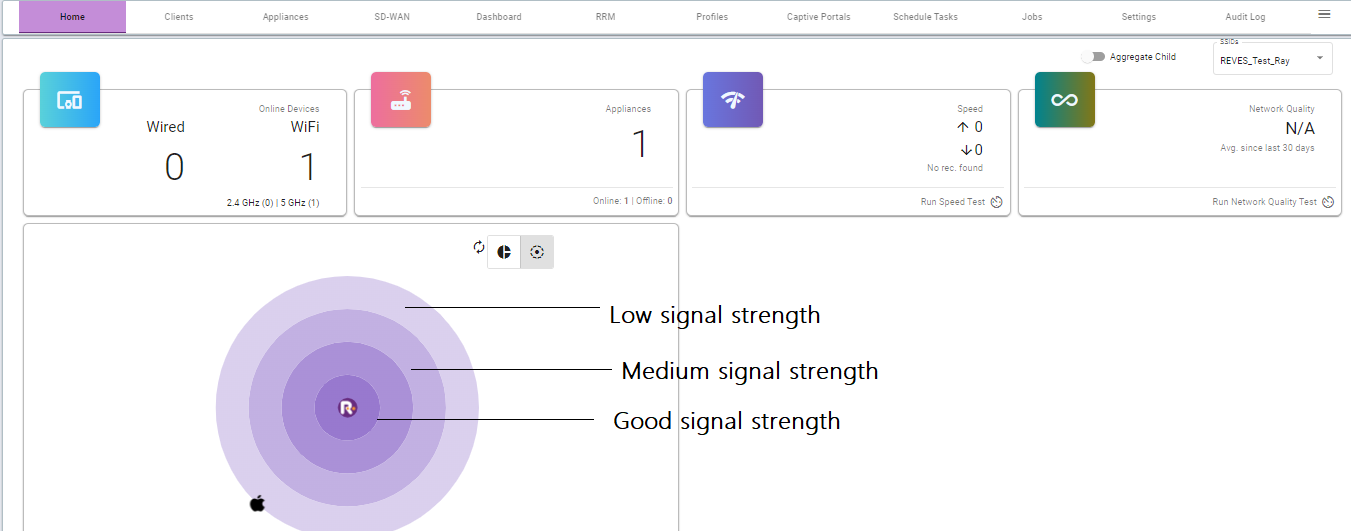
Congestion:
If there are too many devices connected to the wireless network, it can become congested, leading to connectivity issues.
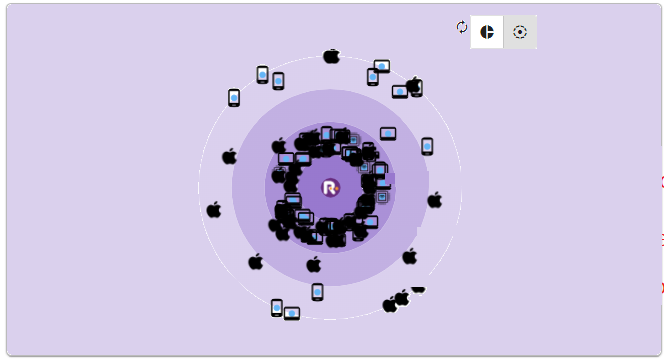
When a wireless network becomes congested, it can result in increased latency, packet loss, and reduced overall network performance. This congestion can be caused by an excessive number of devices trying to access the network simultaneously, leading to a bottleneck in data transmission.
Try disconnecting some devices or connecting to a different, less congested network.
You can track the device using its Mac address on your Ray controller. see the below image as a reference.
Configuring SSID and Security Settings:
When configuring a wireless network, there are several key aspects to consider. These include setting up the wireless access point, configuring the SSID and security settings, managing IP addresses, and optimizing the network for performance and coverage.
Filtering: Some wireless access points have MAC address filtering enabled, which restricts access to specific devices based on their MAC addresses. Check on the RAY Controller if the MAC address of the end device is allowed on the network.
To learn more about RAY device Configuration and Security Settings follow the below KBs article links.
Single / Multiple- WLAN/SSID profiles: https://support.ray.life/support/solutions/articles/81000412415-single-multiple-wlan-ssid-profiles-
How to create Device Policy.
https://support.ray.life/en/support/solutions/articles/81000412593-how-to-create-device-policy-
Outdated Drivers: Ensure that the network drivers on the end device are up to date. Outdated drivers can cause compatibility issues and prevent the device from connecting to the wireless network.
Thank you,
Ray support Team