An IPsec (Internet Protocol Security) tunnel is a secure, encrypted connection between two devices or networks over the Internet. It provides a way to securely transmit data between the two endpoints by encrypting the traffic and authenticating the communicating parties. IPsec can be used to create a virtual private network (VPN) for secure communication over public networks.
In Ray controller go to Appliance > click on the three dots > debugging utilities.
To learn more about debugging utilities follow the document using the below link.
https://support.ray.life/en/support/solutions/articles/81000412686-network-troubleshooting-on-ray-devices-using-commands
1. Ping destination
For initial IPsec tunnel troubleshooting ping the destination IP address and make sure the packet is received or not.
make sure the connectivity is proper on the remote side.
2. Traceroute for Destination tunnel IP
Run the Traceroute command to understand the packet follow or identify the route.
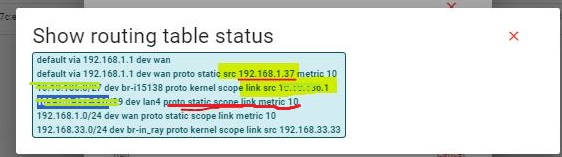
3. Check the routing table.
Make sure the route will be present in the routing table on both sides.
To better understand see the below image, here you can see under the red line the source address is not available.
4. Check IPsec configuration.
Check the configuration so that cannot affect communication between the desired networks.
You can test your IPsec VPN tunnel by pinging a destination IP address in the Remote Local subnet from an IP address in your LAN.


