Ray AP booting process with LED light status #
When you plug in the cable into the AP and after all the settings and registration is done,
then your AP behavior will be as explained below.
( i ) When you first plug in the cable into a fresh AP, it will start fast blinking after approx
30 seconds of your cable plugin.
( ii ) after 30 seconds of fast blinking, it will start blinking slowly for 40 seconds, if slow blinking extends more than 40 seconds then don’t worry, let it finish blinking for few more seconds,
and wait for at least the next 5 minutes until it becomes stable.
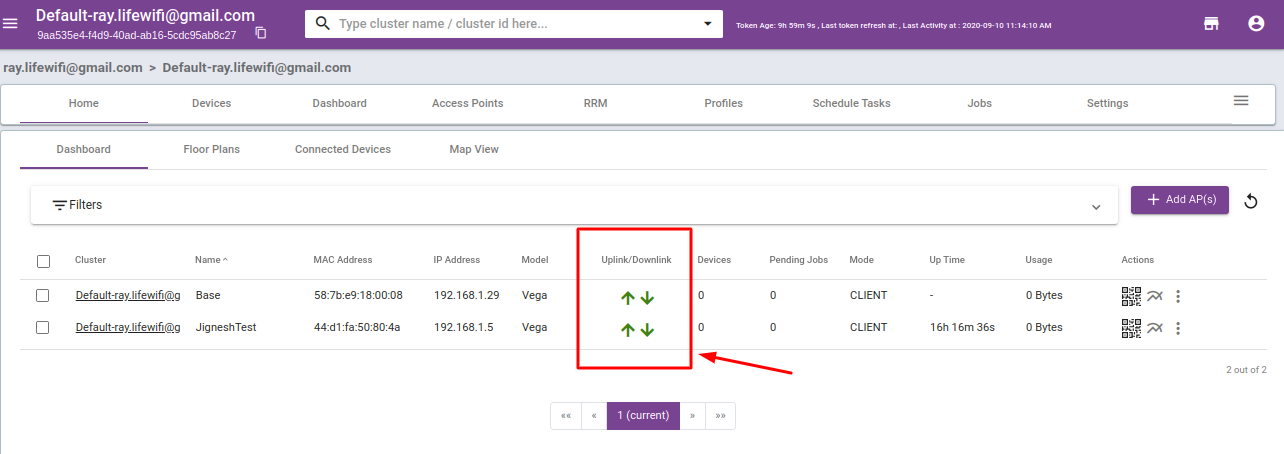
(iii) Once you see the AP’s blue led stable, login into your Ray controller and check the status
of your AP under the access point tab, the status of up and down should be with a green
color arrow, that is the sign of your RAY AP is up and running and ready for the use.
Refer to the below image to get an idea about the functional status of RAY AP.
The arrows highlighted with the red square is the indication of AP’s Upstate.