
Static NAT Configuration Guide
Static NAT is used to create a fixed one-to-one IP translation between an internal LAN device and a translated IP address on the WAN side.
In Static NAT, one internal IP address is mapped to one translated IP address. Whenever the internal device communicates with the external network, the firewall changes the internal IP address to the translated IP address.
Example:
Internal IP Address: 10.10.10.104
Translated IP Address: 192.168.66.162
When traffic goes outside, the external network will see the traffic coming from 192.168.66.162 instead of 10.10.10.104.
Static NAT is commonly used for servers, CCTV systems, internal applications, or any device that requires a fixed translated IP address.
Summary:
In this LAN to WAN Static NAT 1:1 test, the LAN device 10.10.10.104 is mapped to the translated WAN2 IP 192.168.66.162.
WAN2 already has the primary IP 192.168.66.161, and the translated IP 192.168.66.162 is added as an additional IP using Auto attach translated address.
After this configuration, the LAN device traffic is successfully translated and sent through WAN2 using the Static NAT translated IP.
Static NAT Configuration Steps
Go to the NAT Rules section.
Create a new NAT rule profile.

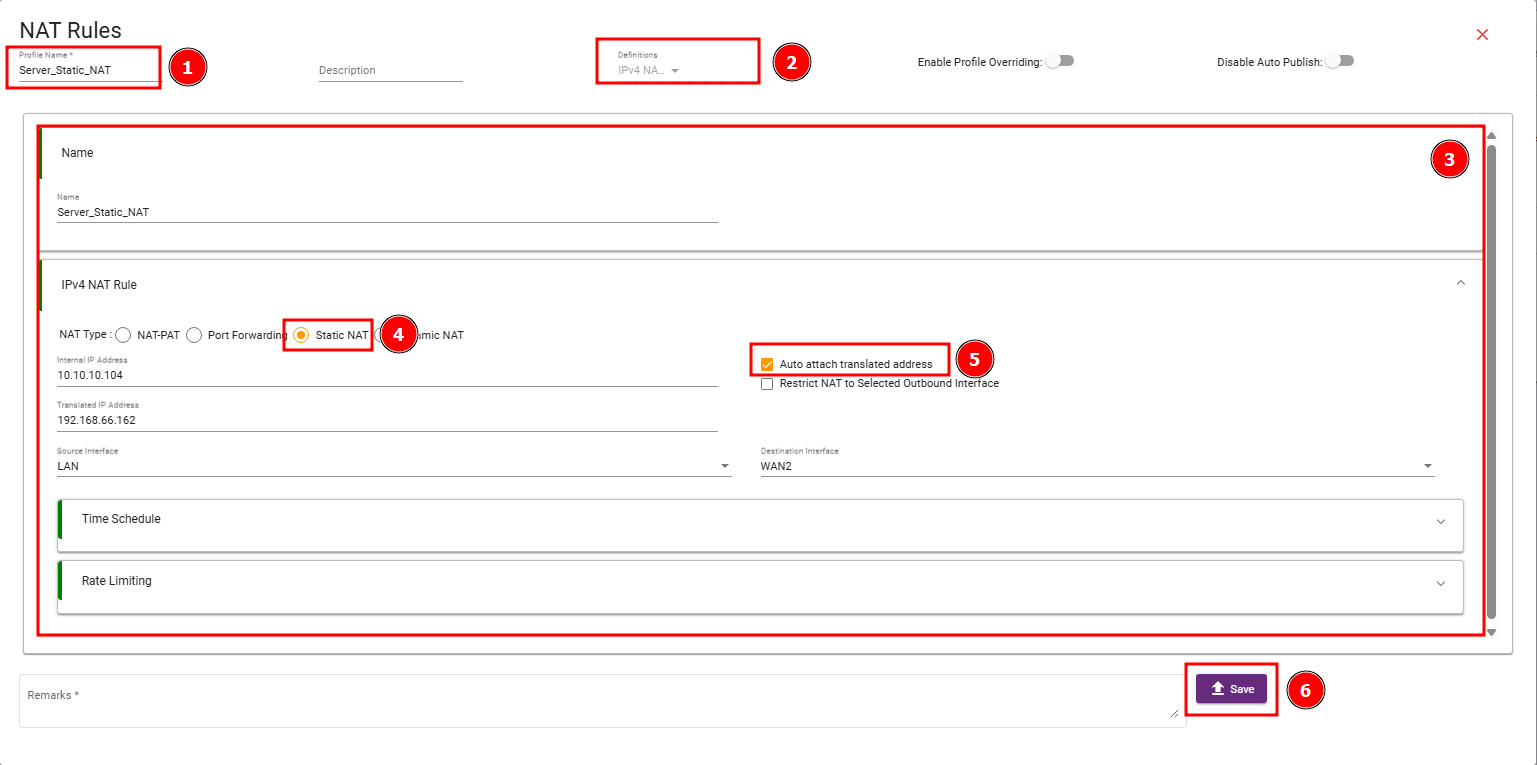
Enter the profile name.
Example:
Server_Static_NAT
Select the definition as:
IPv4 NAT
Open the IPv4 NAT Rule section.
Select the NAT type as:
Static NAT
Enter the internal IP address of the LAN device.
Example:
10.10.10.104
Enter the translated IP address.
Example:
192.168.66.162
Select the source interface.
Example:
LAN
Select the destination interface.
Example:
WAN2
Enable Auto attach translated address if the translated IP address should be automatically added to the selected WAN interface.
Save the configuration.
Auto Attach Translated Address
The Auto attach translated address option is used to automatically add the translated IP address to the selected WAN interface.
For example, if the WAN interface already has a primary IP address and Static NAT uses another translated IP address, the system will attach the translated IP as an additional address on that WAN interface.
This helps the firewall properly use the translated IP address for Static NAT.
How Static NAT Works
When an internal device sends traffic to the external network, the firewall applies Static NAT and changes the source IP address.
Before Static NAT:
10.10.10.104 → Internet
After Static NAT:
192.168.66.162 → Internet
When the reply traffic comes back, the firewall translates the traffic back to the original internal device.
Return traffic:
Internet → 192.168.66.162
After reverse translation:
Internet → 10.10.10.104
This allows the internal device to communicate externally using a dedicated translated IP address.
Important Notes
The translated IP address should be different from the WAN2 primary interface IP.
The translated IP address must belong to the WAN2 network or must be routed toward the firewall.
Auto attach translated address should be enabled so the translated IP is added to WAN2 automatically.
For multi-WAN setups, make sure the traffic is routed through the same WAN interface selected in the Static NAT rule.
Static NAT changes the IP address, while routing decides the interface path. Both NAT and routing must be correct for Static NAT to work properly.