
Troubleshooting Steps for SD-WAN Best Path Verification
This document provides a structured procedure to verify SD-WAN Best Path behavior. The goal is to confirm that the SD-WAN engine detects WAN degradation, recalculates WAN scores, selects the correct WAN interface, and updates the forwarding path dynamically based on SLA evaluation.
2. Verification Flow- First verify the active route from the client side.
- Check the SD-WAN device Best Path logs in real time.
- Confirm which WAN interface is selected as the current winner.
- Run traceroute to validate the actual forwarding path.
- Compare log output and traceroute result to confirm Best Path switching behavior.
Before analyzing SD-WAN Best Path behavior, confirm that the client is forwarding traffic through the expected gateway or WAN path.
- 3.1 Windows Client
Use the following command to verify the active route:
route print
Verify the default route, gateway IP address, interface metric, and active interface used for internet traffic.
- 3.2 Linux Client
Use the following command to check routing information:
ip r
Verify that the default route and gateway are pointing toward the expected SD-WAN path.
4. SD-WAN Device Log Verification
Before monitoring the logs, first enable the required Detailed Best Path Logs option on the SD-WAN device.
Reference Image: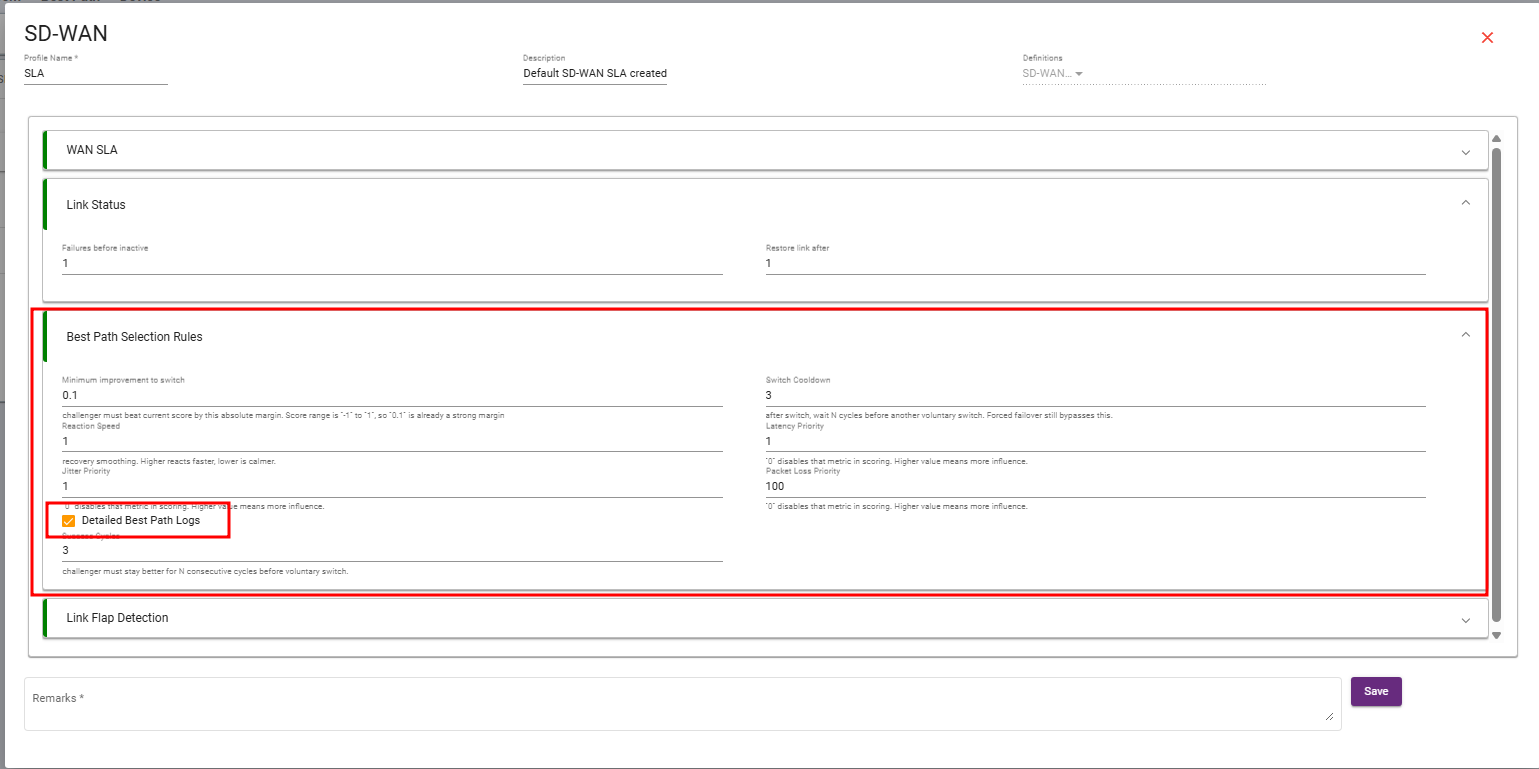
Ray Device – Best Path Selection Rules
This section explains how the Ray device compares WAN link quality and decides when traffic should be switched from the current WAN path to a better available path.
1. Minimum Improvement to Switch
Current Value: 0.1
This value defines how much better the challenger WAN link must be compared to the current active WAN link before the Ray device performs a path switch.
The WAN score range is generally from -1 to +1. In this range, a value of 0.1 is already considered a strong margin.
This prevents unnecessary switching when two WAN links have almost similar quality.
2. Reaction Speed
Current Value: 1
Reaction Speed controls how quickly the Ray device reacts to WAN quality changes.
A higher value makes the device react faster when link quality changes. A lower value makes the system calmer and more stable.
With the value set to 1, the system will react normally and avoid overly aggressive switching.
3. Jitter Priority
Current Value: 1
Jitter Priority defines how much influence jitter has during WAN score calculation.
Jitter means variation in packet delay. It is important for real-time traffic such as voice, video calls, and online meetings.
A value of 0 disables jitter from scoring. A higher value gives jitter more importance in the best path decision.
4. Detailed Best Path Logs
Current Value: Enabled
This option enables detailed logs for best path decision-making.
When enabled, the Ray device records detailed information about WAN score calculation, path comparison, and switching decisions.
This is useful for troubleshooting, analysis, and understanding why the device selected or changed a WAN path.
5. Success Cycles
Current Value: 3
Success Cycles defines how many consecutive cycles the challenger WAN link must remain better before the Ray device switches traffic to it.
With the value set to 3, the challenger WAN link must stay better for 3 continuous cycles before traffic is moved.
This helps avoid unnecessary switching caused by temporary link improvement.
6. Switch Cooldown
Current Value: 3
Switch Cooldown defines how many cycles the Ray device should wait after performing a switch before considering another voluntary switch.
With the value set to 3, the device waits for 3 cycles after switching before making another normal path change.
This prevents frequent path flapping. However, forced failover can still bypass this cooldown if the active link fails.
7. Latency Priority
Current Value: 1
Latency Priority defines how much influence latency has in WAN score calculation.
Latency means network delay. Lower latency is better for real-time and business-critical traffic.
A value of 0 disables latency from scoring. A higher value gives latency more importance in selecting the best WAN path.
8. Packet Loss Priority
Current Value: 100
Packet Loss Priority defines how much influence packet loss has in WAN score calculation.
The current value is 100, which means packet loss has very high importance in best path selection.
This is useful because packet loss directly affects application performance, voice/video quality, and tunnel stability. If a WAN link has packet loss, the Ray device will strongly prefer another better path.
How It Works
The Ray device continuously monitors all available WAN links and calculates a quality score for each link based on configured SLA parameters such as latency, jitter, packet loss, and other priorities.
After calculating the scores, the device compares the current active WAN link with the challenger WAN link. If the challenger link is better by at least the configured Minimum Improvement to Switch value, and it remains better for the configured Success Cycles, the Ray device selects it as the new best path.
After switching, the Switch Cooldown timer prevents frequent path changes. This keeps traffic stable and avoids unnecessary WAN flapping.
After enabling the option and confirming the client-side routing path, monitor the Best Path logs on the SD-WAN device using the following command:
logread -f -e best path
This command filters Best Path-related events and displays interface score, winner selection, and path change decisions.
5. Observed Best Path Log Evidence
The following captured logs show SD-WAN Best Path evaluation between eth0 and eth3. The logs include SLA values, WAN scores, winner selection, and no-change decision logic.

- 5.1 eth0 Selected as Winner
In this log sample, eth3 shows degraded SLA values with high latency and packet loss. As a result, eth0 becomes the active Best Path winner.

- 5.2 eth3 Selected as Winner
In this log sample, eth0 shows degraded SLA values with high latency, jitter, and packet loss. The SD-WAN engine keeps or selects eth3 as the better path.

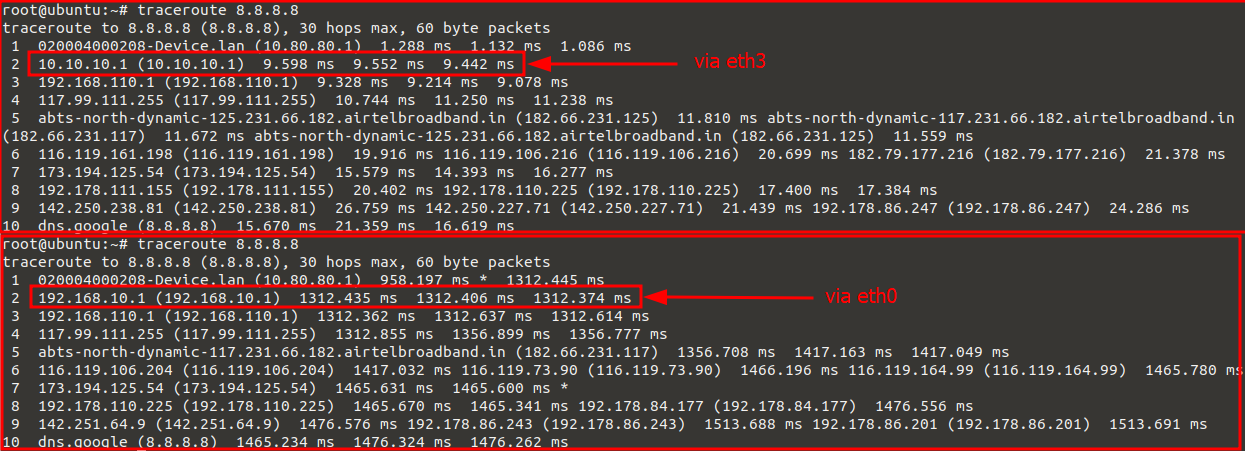
After confirming Best Path selection from logs, run traceroute from the client to verify the actual forwarding path.
traceroute 8.8.8.8
In the captured output, two different forwarding paths are visible:
- When traffic exits through eth3, the second hop is 10.10.10.1.
- When traffic exits through eth0, the second hop is 192.168.10.1.
- This confirms that the forwarding path changes according to Best Path selection.
- SD-WAN device detects WAN degradation through SLA monitoring.
- WAN score is recalculated based on latency, jitter, packet loss, and probe result.
- The Best Path engine selects the WAN interface with the better score.
- Policy routing is updated dynamically according to the selected winner.
- Traceroute output confirms the actual traffic forwarding path after switching.
The provided logs and traceroute results confirm that SD-WAN Best Path is functioning as expected. The SD-WAN engine evaluates eth0 and eth3 using SLA metrics, calculates WAN scores, selects the optimal winner, and updates the forwarding path. Traceroute output validates that traffic path changes according to the selected WAN interface.