
NAT/PAT Configuration Guide
NAT/PAT is used for outbound traffic translation.
When an internal LAN client accesses the internet or an external network, the firewall changes the private source IP address to a WAN-side or configured NAT IP address.
PAT also uses port numbers to allow many internal users to share the same translated IP address.
Before NAT/PAT:
10.10.10.2:45678 -> 8.8.8.8:443
After NAT/PAT:
Firewall_WAN_IP:61001 -> 8.8.8.8:443
NAT/PAT Configuration
NAT/PAT is used when internal LAN users need to access an external network or the internet through the firewall WAN interface.
In this configuration, private LAN IP addresses are translated before the traffic leaves the firewall. This allows multiple internal users to access the internet using the firewall WAN IP or a defined source NAT IP.
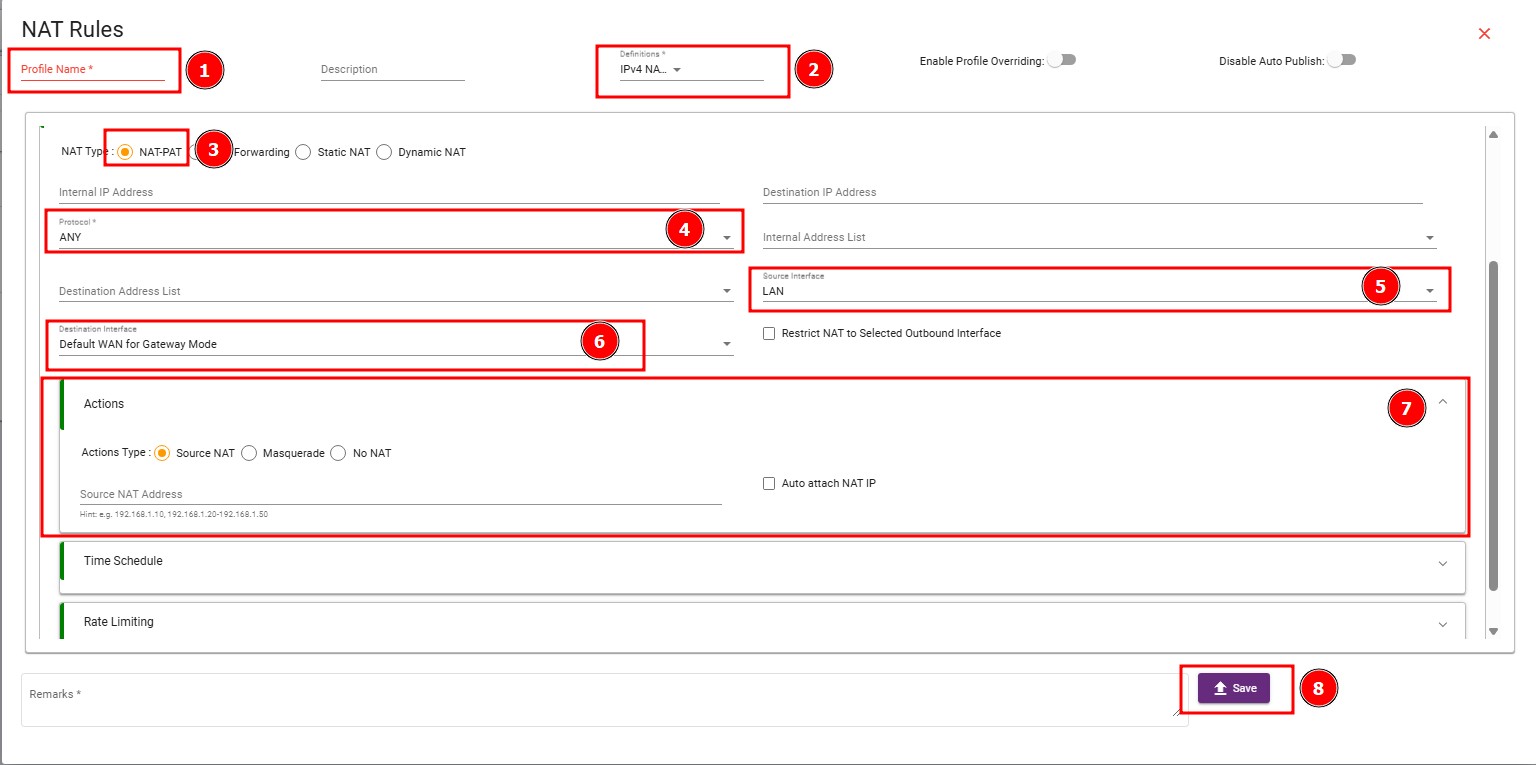
The Protocol option can be kept as ANY for basic testing and general internet access. This allows TCP, UDP, ICMP and other traffic types to match the NAT rule.
The Source Interface should be selected as the internal interface from where client traffic enters the firewall. In the provided screenshot, the source interface is selected as LAN. This means traffic coming from the LAN side will match this NAT/PAT rule.
The Destination Interface should be selected as the outbound interface through which traffic exits the firewall. In the screenshot, the destination interface is selected as Default WAN for Gateway Mode. This means LAN traffic will be translated and sent out through the default WAN connection.
Action Type Explanation:
The Actions Type section is the most important part of the NAT/PAT configuration. It defines how the firewall should handle the source IP address of the outgoing traffic.
Source NATSource NAT changes the original source IP address to a specific configured NAT IP address. Use this when you want internal traffic to go out using a fixed public IP or a dedicated translated IP.
Before Source NAT:
10.10.10.2 -> Internet
After Source NAT:
203.1.1.10 -> Internet
- Use Source NAT when you have a static public IP address.
- Use Source NAT when a remote server has whitelisted only one public IP.
- Use Source NAT when different LAN subnets must use different outbound public IPs.
- If Source NAT is selected, enter the Source NAT Address or enable Auto attach NAT IP as per the design requirement.
Masquerade is the most common NAT/PAT action. It automatically translates the internal source IP to the current IP address of the outgoing WAN interface. You do not need to manually enter the translated public IP.
Before Masquerade:
10.10.10.2 -> Internet
After Masquerade:
Firewall WAN IP -> Internet
- Use Masquerade for normal LAN-to-internet access.
- Use Masquerade for DHCP WAN, PPPoE, LTE/4G/5G, or dynamic WAN connections.
- Masquerade is the recommended option for a basic NAT/PAT internet test.
- If the WAN IP changes, Masquerade automatically uses the new WAN IP.
No NAT means the firewall does not translate the source IP address. The original client IP remains visible to the destination network.
Before No NAT:
10.10.10.2 -> 192.168.50.10
After No NAT:
10.10.10.2 -> 192.168.50.10
- Use No NAT for site-to-site VPN traffic when the remote side must see the real LAN IP.
- Use No NAT for MPLS, private WAN, and inter-branch routed traffic.
- Use No NAT when policy, routing, or logging depends on the original source IP.
- Place No NAT exemptions before general Masquerade rules, otherwise the traffic may get translated incorrectly.
For a basic NAT/PAT rule, Masquerade is usually the best option. Use Source NAT only when a specific translated IP address is required. Use No NAT only when traffic should pass without address translation, such as VPN or private routed network traffic.