
EXTERNAL CAPTIVE PORTAL AND RADIUS INTEGRATION
The external captive portal integration works through REST API calls.
The solution allows users to authenticate through an external captive portal and an external RADIUS server configured on the controller.
After successful authentication, the controller starts the user session based on the attributes received in the RADIUS Access-Accept response.
AUTHENTICATION FLOW
- The external captive portal is configured on the controller.
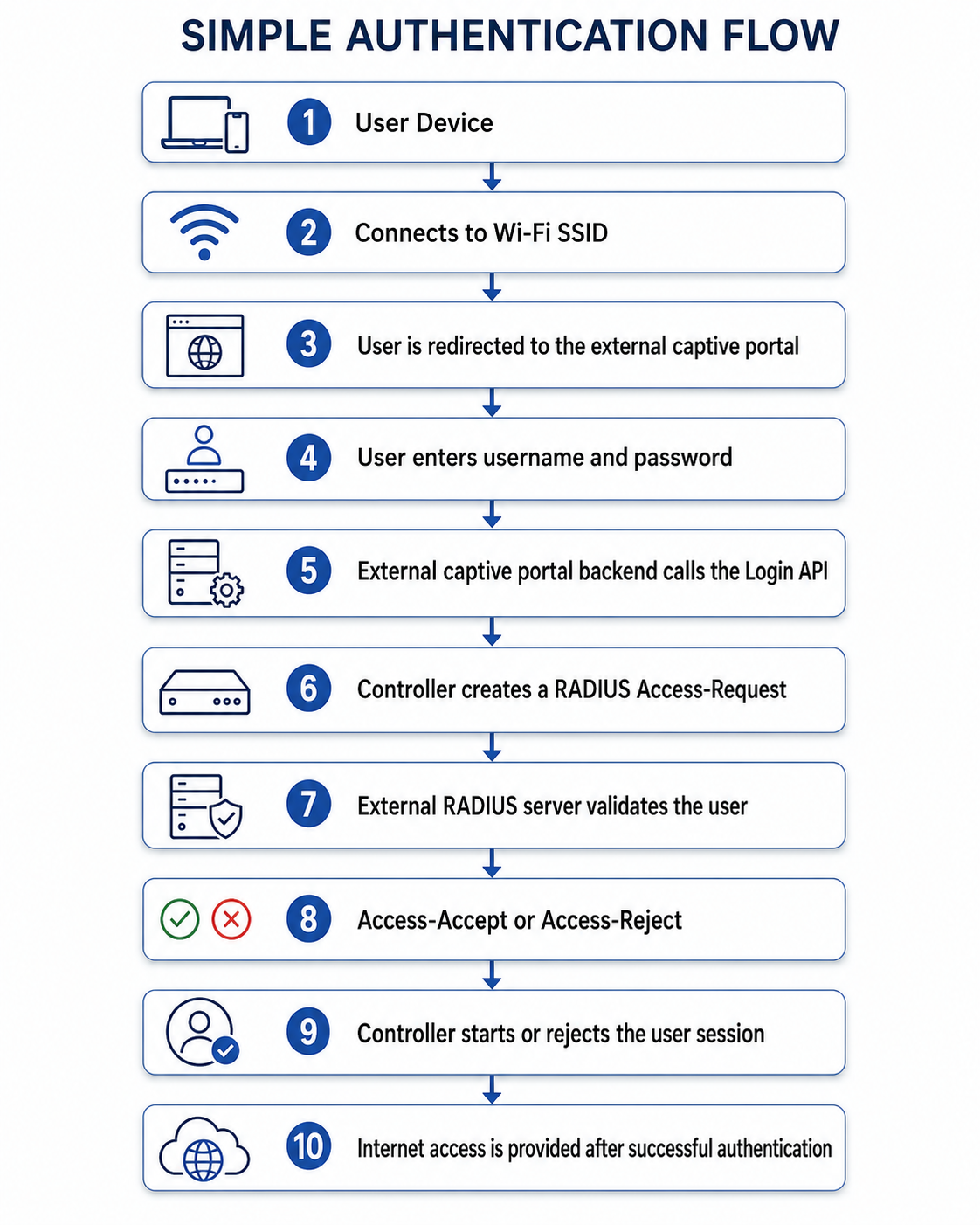
- When a user connects to the configured Wi-Fi network, the user is redirected to the external captive portal.
- The redirected captive portal URL contains the following information:
• SSID
• Client MAC address
• Access Point MAC address
• Unique ID
• Device IP address
- The user enters their username and password on the external captive portal.
- The external captive portal sends the user credentials and redirected URL parameters to its backend server.
- The external portal backend sends a REST API request to the controller Login API.
- After receiving the Login API request, the controller creates a RADIUS Access-Request.
- The Access-Request is sent to the external RADIUS server configured on the controller.
- The external RADIUS server validates the user credentials.
- The RADIUS server returns one of the following responses:
• Access-Accept
• Access-Reject
- If an Access-Accept response is received, the controller starts the user session using the attributes received from the RADIUS server.
- If an Access-Reject response is received, the user is not provided internet access.
SIMPLE AUTHENTICATION FLOW
LOGIN API DETAILS
The Login API must be called by the external captive portal backend after the user submits their login credentials.
HTTP Method
POST
Login URL
https://captivecloud.ray.life/ripple/smpLogin
Content Type
application/json
LOGIN API REQUEST PARAMETERS
The following parameters must be included in the Login API request.
- ssid: Copy the SSID value received in the captive portal redirect URL and pass it without any modification.
- client_mac: Copy the client device MAC address received in the captive portal redirect URL and pass it without any modification.
- ap_mac: Copy the Access Point MAC address received in the captive portal redirect URL and pass it without any modification.
- unique_id: Copy the unique ID received in the captive portal redirect URL and pass it without any modification.
- device_ip: Copy the client device IP address received in the captive portal redirect URL and pass it without any modification.
- request_username: This is the shared API username configured by both parties. It is used to verify that the Login API request is coming from an authenticated and authorized source.
- request_password: This is the shared API password configured by both parties. It is used along with the request username to authenticate the Login API request.
- client_username: This is the username entered by the user on the external captive portal login page. The controller forwards this username to the external RADIUS server for user authentication.
- client_password: This is the password entered by the user on the external captive portal login page. The controller forwards this password securely to the external RADIUS server for user authentication.
SAMPLE LOGIN API REQUEST
{
“ssid”: “Guest-WiFi”,
“client_mac”: “AA:BB:CC:DD:EE:FF”,
“ap_mac”: “11:22:33:44:55:66”,
“unique_id”: “123456”,
“device_ip”: “192.168.10.25”,
“request_username”: “shared_api_username”,
“request_password”: “shared_api_password”,
“client_username”: “guest.user”,
“client_password”: “user_password”
}
LOGIN REQUEST PROCESSING
After receiving the Login API request, the controller performs the following actions:
- Validates the request_username and request_password.
- Verifies the user and device information received in the request.
- Creates a RADIUS Access-Request.
- Sends the Access-Request to the configured external RADIUS server.
- Waits for an Access-Accept or Access-Reject response.
- Starts the user session if Access-Accept is received.
- Rejects the login request if Access-Reject is received.
- Applies the session attributes received from the external RADIUS server.
RADIUS AUTHENTICATION
The controller sends the user authentication details to the external RADIUS server through a RADIUS Access-Request.
The external RADIUS server validates the user credentials and returns one of the following responses.
Access-Accept
The user authentication is successful.
The controller starts the user session and applies the attributes received in the Access-Accept response.
Access-Reject
The user authentication has failed.
The controller does not start the user session and internet access is not provided.
TIME-BASED QUOTA
Time-based quota is supported through standard RADIUS attributes.
The external RADIUS server can send the following attributes in the Access-Accept response:
• Session-Timeout
• Idle-Timeout
Session-Timeout
This attribute defines the maximum duration for which the user session can remain active.
Once the configured duration is completed, the controller terminates the user session.
Idle-Timeout
This attribute defines the maximum duration for which the user can remain inactive.
If no user activity is detected for the configured duration, the controller terminates the session.
VOLUME-BASED QUOTA
Volume-based quota must be provided through a Vendor-Specific Attribute, also known as a VSA.
The following VSA information must be shared before enabling volume-based quota:
• Vendor ID
• Vendor name
• Attribute name
• Attribute number
• Data type
• Unit of measurement
• Quota value format
The volume quota can be provided in:
• Bytes
• Megabytes
• Gigabytes
The exact VSA format must be agreed upon by both parties before implementation.
RADIUS ACCOUNTING
The controller sends RADIUS accounting packets to the configured external RADIUS server.
RADIUS accounting is used to track user session duration and data consumption.
ACCOUNTING START
An Accounting-Start packet is sent when the authenticated user session begins.
The packet indicates that the user has successfully logged in and the session has started.
INTERIM ACCOUNTING UPDATE
The controller sends regular Accounting-Interim-Update packets while the user session is active.
The interim update interval is configurable on the controller.
The interim accounting packets may contain the following information:
• User session duration
• Uploaded data
• Downloaded data
• Total data usage
• Client IP address
• Client MAC address
• Access Point MAC address
• Session ID
• Username
• NAS information
ACCOUNTING STOP
An Accounting-Stop packet is sent when the user session ends.
The session may end because of any of the following conditions:
• User manually logs out
• Session timeout is reached
• Idle timeout is reached
• User device disconnects
• User quota is completed
• Session is manually terminated
• Controller terminates the session
LOGOUT API DETAILS
The Logout API can be used when the external system needs to manually terminate an active user session.
HTTP Method
POST
Logout URL
https://captivecloud.ray.life/ripple/smpLogout
Content Type
application/json
LOGOUT API REQUEST PARAMETERS
The following parameters must be included in the Logout API request.
- ssid: Copy the SSID value received in the captive portal redirect URL and pass it without any modification.
- client_mac: Copy the client device MAC address received in the captive portal redirect URL and pass it without any modification.
- ap_mac: Copy the Access Point MAC address received in the captive portal redirect URL and pass it without any modification.
- unique_id: Copy the unique ID received in the captive portal redirect URL and pass it without any modification.
- device_ip: Copy the client device IP address received in the captive portal redirect URL and pass it without any modification.
- request_username: This is the shared API username configured by both parties. It is used to verify that the Logout API request is coming from an authenticated and authorized source.
- request_password: This is the shared API password configured by both parties. It is used along with the request username to authenticate the Logout API request.
- client_username: This is the username associated with the currently active user session. The controller uses this value to identify and terminate the correct user session.
SAMPLE LOGOUT API REQUEST
{
“ssid”: “Guest-WiFi”,
“client_mac”: “AA:BB:CC:DD:EE:FF”,
“ap_mac”: “11:22:33:44:55:66”,
“unique_id”: “123456”,
“device_ip”: “192.168.10.25”,
“request_username”: “shared_api_username”,
“request_password”: “shared_api_password”,
“client_username”: “guest.user”
}
LOGOUT REQUEST PROCESSING
After receiving a valid Logout API request, the controller performs the following actions:
- Validates the shared request username and password.
- Identifies the active user session using the supplied user and device details.
- Terminates the active user session.
- Removes internet access for the user.
- Sends a RADIUS Accounting-Stop packet to the external RADIUS server.
COMPLETE USER SESSION FLOW
- The user connects to the configured Wi-Fi SSID.
- The user is redirected to the external captive portal.
- The redirected URL contains the SSID, client MAC address, Access Point MAC address, unique ID and device IP address.
- The user enters their username and password.
- The external captive portal backend sends a request to the Login API.
- The controller validates the API credentials.
- The controller creates a RADIUS Access-Request.
- The Access-Request is sent to the external RADIUS server.
- The external RADIUS server returns an Access-Accept or Access-Reject response.
- If Access-Accept is received, the controller starts the user session.
- The controller sends a RADIUS Accounting-Start packet.
- The controller sends regular Accounting-Interim-Update packets.
- The user session continues according to the configured timeout and quota values.
- The session ends when the user logs out, the timeout is reached, the quota is completed or the device disconnects.
- The controller sends a RADIUS Accounting-Stop packet.
IMPORTANT IMPLEMENTATION NOTES
• The Login and Logout APIs should be called from the external portal backend.
• The APIs should not be called directly from browser-side JavaScript.
• The request_username and request_password must be stored securely on the backend.
• API credentials must not be exposed in frontend code, browser logs or browser network requests.
• All values received in the redirected captive portal URL must be passed without modification.
• MAC addresses should use a consistent format across the portal, controller and RADIUS server.
• All API requests must use HTTPS.
• The external RADIUS server must be reachable from the controller.
• The same RADIUS shared secret must be configured on the controller and the external RADIUS server.
• The RADIUS authentication and accounting ports must be configured correctly.
• The Vendor-Specific Attribute for volume-based quota must be finalized before enabling volume quota.
• The interim accounting interval can be configured on the controller.
• The external portal backend should securely handle user credentials.
• Sensitive information should never be stored in application logs.
• The API response should be handled properly to show login success or failure to the user.