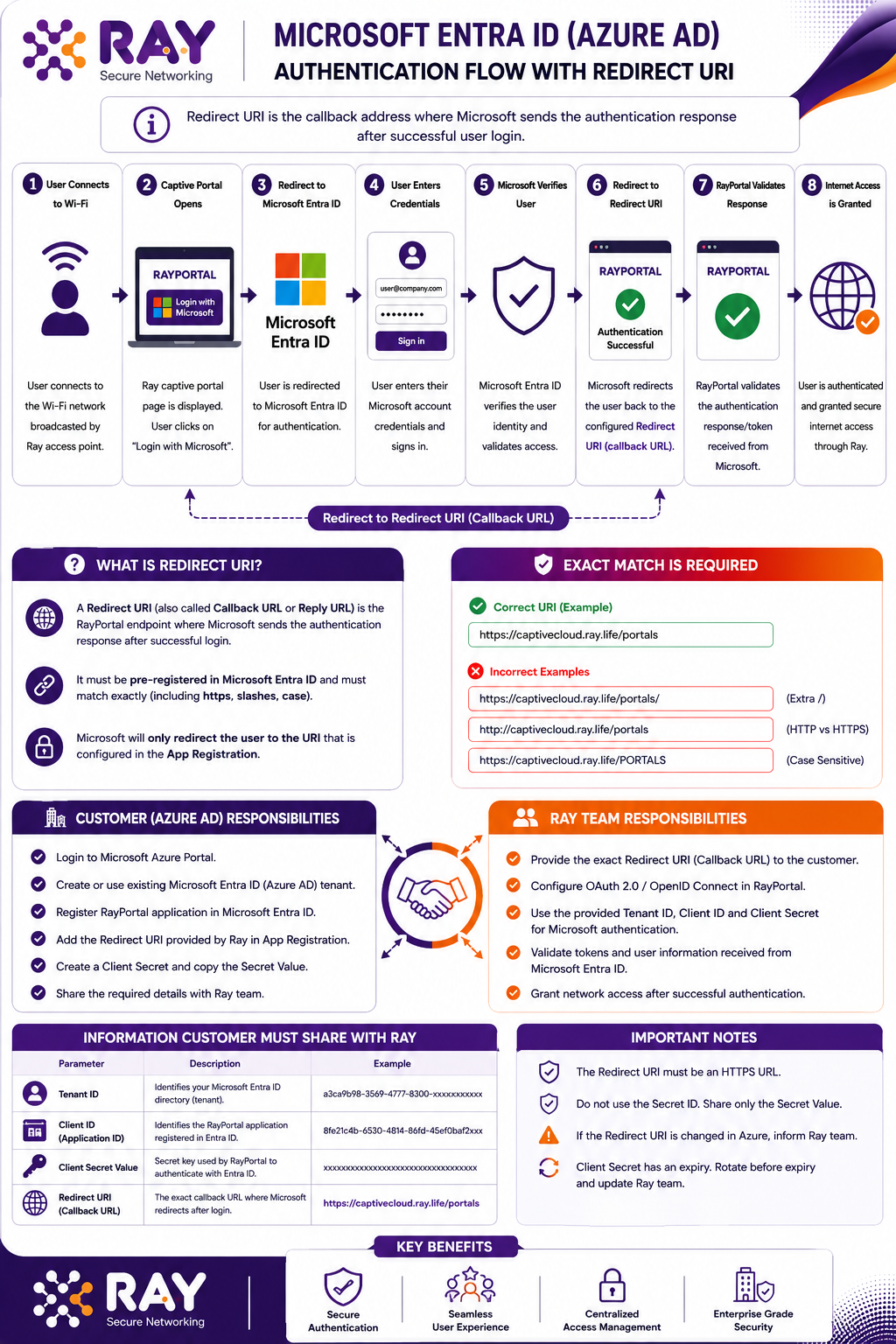
Microsoft Entra ID (Azure AD) Authentication Flow Guide: Ray Captive Portal
This document explains the Microsoft Entra ID configuration and authentication flow required to allow users to sign in to the Ray Captive Portal using their organization’s Microsoft accounts.
Simple objective
The customer creates and controls the Microsoft Entra ID application. The customer then securely shares the required application identifiers and secret with Ray. Ray configures the captive portal and validates the end-to-end login flow.
1. Sign in and open Microsoft Entra IDSign in to the Azure portal using an authorized administrator account. Search for Microsoft Entra ID (the current name for Azure Active Directory) and open the service.
- Portal URL: https://portal.azure.com
- Required role: an account permitted to manage app registrations
- Expected result: the Microsoft Entra ID tenant overview is available

2. Verify the customer tenant and copy the Tenant ID
Open the correct organization tenant. Verify the tenant name and primary domain, then copy the Directory (Tenant) ID.
- Confirm that users who require captive portal access exist in this tenant
- Do not use an unrelated test tenant for production integration
- Record the Tenant ID in the customer handover table

3. Register the RayPortal application
Navigate to App registrations and create a new registration. Use a clear application name such as RayPortal. For a customer-only corporate login, Single tenant is normally appropriate unless the solution scope explicitly requires multiple organizations.
- Application name: RayPortal
- Account type: confirm with Ray and customer security team
- Platform: Web
- Redirect URI: enter the exact HTTPS callback supplied by Ray
After registration, copy the Application (Client) ID


4. Create the client secret
Open the registered application, select Certificates & secrets, and create a new client secret. Copy the Secret Value immediately.
- Share the Secret Value – not the Secret ID
- The Secret Value is displayed only once
- Record the secret expiry date and plan rotation before expiry
- Treat the value as a confidential credential

End-to-End Authentication Flow
The following flow shows how Microsoft authentication is linked to the Ray captive portal session. The user credentials are entered only on the Microsoft sign-in page; RayPortal receives the resulting authorization response and validates the returned identity.