
Improving Client Wi-Fi Speeds Using ACS (Automatic Channel Selection) Command
Problem: Slow Client Speeds in a Multi-AP Environment
In networks with many access points (APs), clients sometimes experience:
-
Slow internet speeds
-
Unstable connections
-
Lag or buffering during video calls or streaming
-
Low throughput despite strong signal
These issues often happen due to channel congestion or interference, especially when multiple APs are operating on overlapping or noisy channels.
Solution: Use ACS to Automatically Select the Best Channel
Automatic Channel Selection (ACS) command is a feature that allows each AP to scan the surrounding environment and choose the least congested, cleanest Wi-Fi channel available.
By running ACS, you allow each AP to:
-
Detect nearby interference from other APs, devices, or networks
-
Avoid channels with high noise or overlapping signals
-
Automatically select a better channel to improve client connection quality
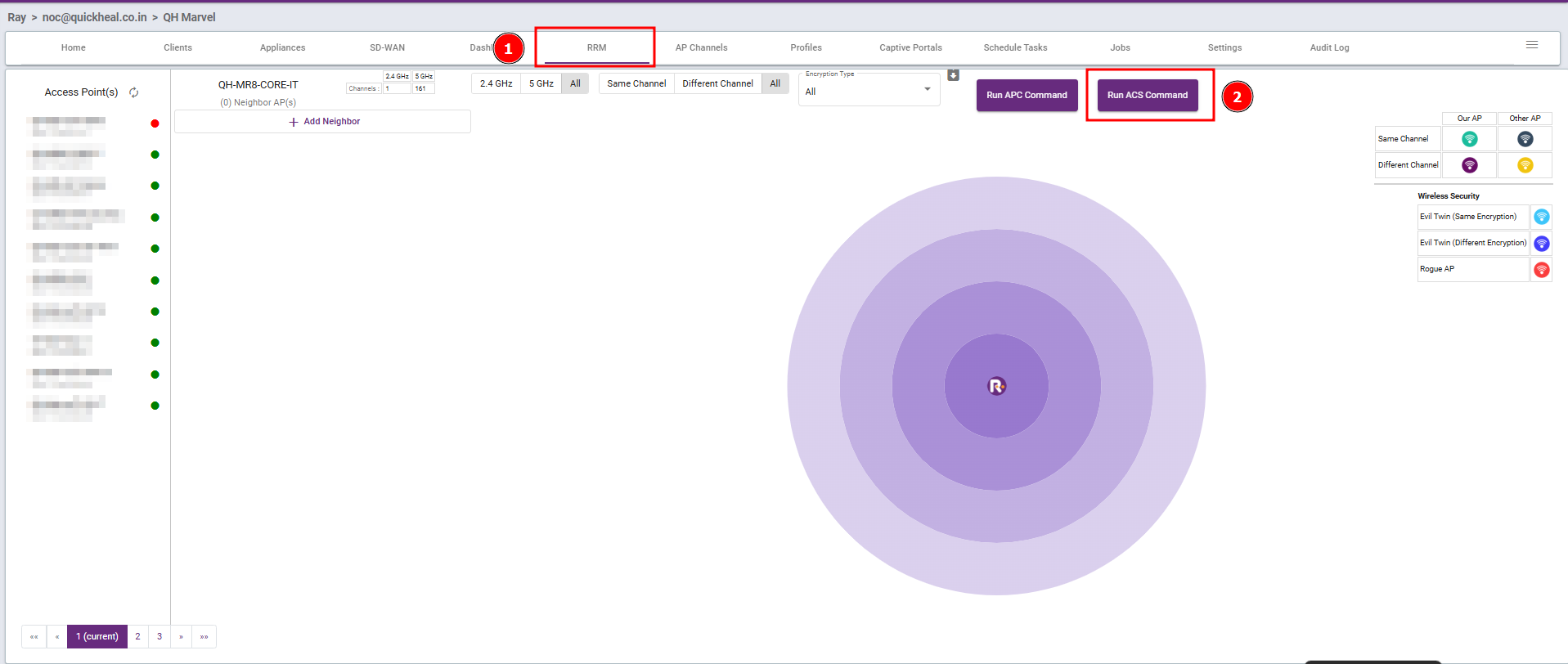
Steps : Navigate to the RRM section, then click Run ACS Command.
Benefits of Using ACS for Speed Issues
-
Boosts Wi-Fi performance for end users
-
Reduces interference from neighboring APs
-
Helps avoid manual channel planning errors
-
Increases overall network stability and user satisfaction
-
Boosts Wi-Fi performance for end users
-
Reduces interference from neighboring APs
-
Helps avoid manual channel planning errors
-
Increases overall network stability and user satisfaction